Platform · User feedback loop
Your users report it. Your AI fixes it.
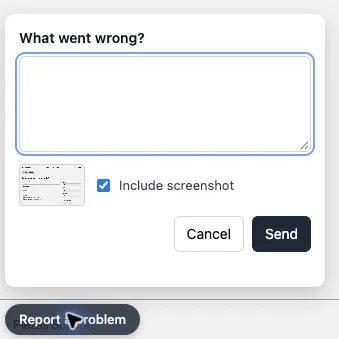
A Report a problem button on every screen of your app. Each report arrives with the page and a screenshot, so nobody retypes a bug. Tell your AI “pull feedback and fix”, and it does.
What it is
A feedback button your AI can read.
Every app you publish on Piezas can show a Report a problem button. Your users click it, say what went wrong and, if they choose, include a screenshot. Piezas keeps each report with the page it came from.
Then you ask Claude or Codex to pull feedback and fix. Your AI reads every report, finds the cause, makes the fix and marks the report as fixed. We use it on our own support desk.
Why you need it
Feedback gets lost between your users and your code.
- Users email “it's broken”, and you can't tell which page.
- You spend more time retyping bug reports than fixing them.
- Most people never report at all. They just stop using your app.
With Piezas, every report arrives ready for your AI to fix.
How it works
Report. Pull. Fix.
From a user's click to a fix that's live, with one prompt from you.
- 01Users reportThey click Report a problem, say what went wrong and, if they like, include a screenshot.
- 02Piezas collectsEach report is kept with the page it came from and its screenshot.
- 03You askTell Claude or Codex: “pull feedback and fix”.
- 04Your AI fixesIt reads each report, finds the cause, makes the fix and marks the report fixed.
- 05Checked and liveThe fix is tested and checked before it goes live, like every other change.
Why it matters
Better apps, without the busywork.
Your users tell you what's wrong. Your AI does the rest.
- No retyping: the page and screenshot come with every report.
- One prompt turns your users' feedback into fixes.
- Every fix goes through the same tests and checks as everything else.
- You choose whether the button shows, with one switch in your console.
- A screenshot is only sent when your user chooses to include one.
- It works on every app you publish on Piezas.
Features
What's included.
- One-click reportingA Report a problem button on every screen of your app.
- ScreenshotsUsers can attach what they saw, without leaving your app.
- Page contextEach report knows the page it came from.
- Pull and fixOne prompt to Claude or Codex reads every report and fixes it.
- Marked fixedFixed reports are marked done, so nothing is fixed twice or forgotten.
- Your switchTurn the button on or off in your console. Publishing never changes it for you.
Where it works.
On every app you publish, with the AI you already use.
- Your published appsWeb apps and server apps on Piezas.
- Claude and CodexAsk either one to pull feedback and fix.
- Your consoleThe switch sits on your app's hosting card.